
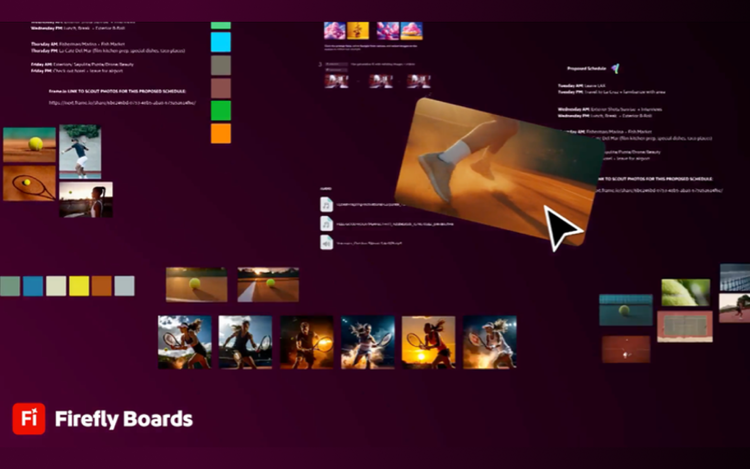
Adobe has taken another decisive step in the fast-moving world of generative media. The company is expanding its Firefly platform with new AI video capabilities that aim to change how visual stories are created, edited, and delivered. These tools are designed to help filmmakers, marketers, and digital creators move from idea to finished footage with far fewer technical barriers.
The latest developments focus on generative video, intelligent editing assistance, and seamless integration with existing production workflows. Adobe says the goal is simple. Make professional video creation faster, safer, and easier while maintaining strong standards around copyright and responsible AI. The result could reshape how studios, agencies, and independent creators produce content in an increasingly competitive media landscape.
How Adobe Firefly Is Redefining AI-Driven Video Creation
Generative AI has moved quickly in the creative sector, and Adobe is positioning Firefly as a platform built specifically for professionals. Unlike many AI tools that pull from broad internet data, Firefly models are trained on licensed and public domain material. This approach helps address growing concerns about copyright, attribution, and the ethical use of creative assets.
Adobe’s new AI video features focus on turning simple prompts into visual sequences. Creators can describe a scene, mood, or action in plain language. The system then generates visual elements that match the request. A user might ask for a city skyline at sunset or a futuristic product showcase. Firefly produces visuals that can be refined and integrated into a larger project.
Speed is one of the biggest advantages. Traditional video production often requires extensive planning, filming, and post-production work. AI tools shorten that timeline by generating assets quickly. Editors can test ideas, experiment with different looks, and refine concepts before committing to full production.
The tools also support creative flexibility. Instead of starting from scratch, teams can use AI to build a foundation for their story. Background scenes, motion graphics, and concept visuals can appear within seconds. Editors then adjust lighting, movement, and composition using familiar editing environments.
Integration with Adobe’s broader ecosystem is another key element. Firefly works closely with tools such as Adobe Premiere Pro and After Effects. This allows creators to move from AI-generated content to traditional editing workflows without switching platforms or losing project data.
Key Features of Adobe Firefly’s AI Video Platform
The platform introduces several capabilities that aim to simplify the video production process while keeping creative control in human hands.
- Text-to-Video Generation
Creators can describe scenes using simple text prompts. Firefly converts those prompts into short video clips or motion sequences that can serve as raw footage or inspiration for a project. - Style and Visual Consistency Tools
The system can maintain consistent lighting, color grading, and artistic style across multiple scenes. This reduces the need for manual adjustments in large projects. - AI-Assisted Editing and Motion Control
Editors can adjust motion, camera angles, and object placement through automated suggestions. The AI analyzes footage and offers options that improve pacing or visual flow. - Content Safety and Licensing Protection
Firefly models are trained on licensed data, including Adobe Stock assets. This reduces the legal risk that many creators worry about when using generative AI. - Workflow Integration Across Adobe Software
AI generated clips can be moved directly into Premiere Pro timelines or enhanced in After Effects. Teams can collaborate without exporting or rebuilding files.
These features create a hybrid environment. AI handles repetitive tasks and early concept development. Human creators maintain full control over storytelling, editing, and final production decisions.
Adobe Firefly AI Video Capabilities at a Glance
| Feature | Description | Practical Benefit |
|---|---|---|
| Text to Video | Converts written prompts into short video clips | Rapid concept creation |
| AI Scene Generation | Builds backgrounds and environments | Saves production time |
| Style Consistency | Maintains visual tone across scenes | Improves brand identity |
| Motion Editing Assistance | Suggests camera movement and pacing | Faster editing workflow |
| Licensed Training Data | Uses approved content sources | Lower copyright risk |
| Integration with Premiere Pro | Seamless editing transition | Smooth production pipeline |
What This Means for the Future of Post-Production
The rise of generative AI is already reshaping the creative industries. Adobe’s Firefly platform shows how technology can complement human creativity instead of replacing it. By automating time-consuming tasks such as scene generation and early editing, creators can focus more on storytelling and artistic direction.
For production companies, the impact could be significant. Video projects often involve tight deadlines and limited budgets. AI tools reduce the cost of experimentation because teams can test visual concepts instantly. This allows filmmakers, advertisers, and social media creators to iterate quickly and produce higher volumes of content without sacrificing quality.
The broader industry may also benefit from stronger copyright protections. Adobe’s approach to training AI models on licensed data addresses one of the biggest concerns surrounding generative technology. If other platforms follow similar practices, the creative ecosystem could see more trust and collaboration between technology providers and professional artists.
AI video generation will not replace traditional filmmaking overnight. Cameras, actors, and physical sets still play a central role in many productions. Yet AI tools are quickly becoming part of the creative toolkit. They assist with planning, design, editing, and visual experimentation.
For professionals who rely on video content, understanding these tools is now essential. Adobe Firefly represents a major step in that direction. It combines automation with professional workflows and ethical AI standards, which may help shape the next era of digital storytelling.
Trending FAQ
What is Adobe Firefly AI video technology?
Adobe Firefly is a generative AI platform that helps creators generate images, video elements, and visual effects from text prompts. Its video tools allow users to produce clips, backgrounds, and motion graphics quickly while maintaining professional editing workflows.
Is Adobe Firefly safe for commercial use?
Yes. Adobe designed Firefly using licensed data and public domain sources. This approach reduces the copyright risks associated with many generative AI systems trained on uncontrolled internet data.
Can Firefly replace traditional video production?
No. The technology is designed to support creators, not replace them. It helps with concept development, asset generation, and editing assistance, but human creators remain responsible for storytelling and final creative decisions.
How does Firefly integrate with existing editing tools?
Firefly connects directly with Adobe software such as Premiere Pro and After Effects. AI generated footage can be edited within these programs without needing separate conversion or import steps.
Who benefits most from Adobe Firefly video tools?
Content creators, marketing teams, film studios, and digital agencies are likely to see the biggest benefits. The technology allows them to create visual content faster, test new ideas, and manage production costs more efficiently.